
File Manager (Document Editor & PDF Creator) PRO4.3 - App Store
You'll be able to see results in few seconds.
Publisher Description
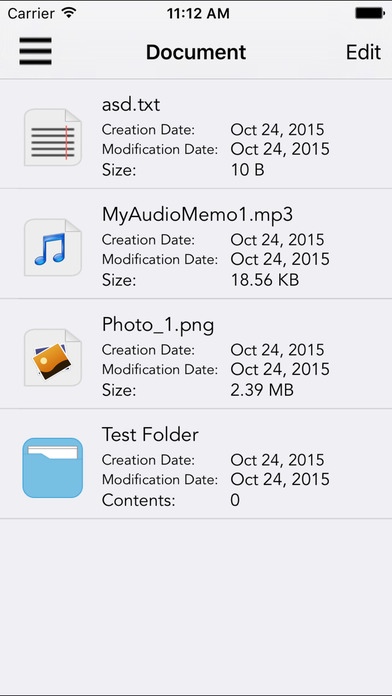
File Manager with PDF Creator & Document Editor app is the all-in-one document management solution for iPhone, iPod touch and iPad. It can catch documents from PC or Mac via USB cable or WIFI, email attachments, Dropbox and Box and save it on your iPhone, iPod Touch or iPad locally. Cool app that allow you to create PDF from Map, Website and any other text files.
It supports PDF, MS Office, iWorks and the most common file types.
File Transfer
- Use iTunes file sharing to transfer files directly to your device via USB cable and WIFI
- You can also transfer file to your app via Wifi file sharing feature from your desktop
- Manage and view documents and upload on box or can download from box
- Handle and view documents and upload on Dropbox or can download from Dropbox
- Open in File feature to open the document in different app like numbers, pages
- Sorting files based on date, size and name
- Search file any time based on specific keyword
Document Editor
- Edit text on your iPhone or iPad and save as rtf file
- Can handle the text file to edit the content in the file and also can share them
PDF Converter
- Convert image, documents (MS Office, iWorks and the most common file types) to PDF
- Build in web browser and convert web pages to PDFs for offline reading on the iPhone or iPad
- Convert maps to PDF and you can read it as PDF for offline usage
PDF Reader
- Advances PDF reader to read in all orientations
- Supports Encrypted (password protected) PDFs
- PDF links to open URL in browser directly
- Supports PDFs with rotated pages
- Bookmark the page in PDF for future reading
Features:
- Document Viewer supports PDF, HTML, RTF, TXT, PNG, JPG, GIF, MS Office (Word, Excel and Powerpoint) and Apple iWork (Keynote, Pages and Numbers) files, etc
- Create folders and sub folders
- Move files from one folder to another
- Send your files to / Open your files in other apps, e.g. numbers, pages, etc.
- Save files from emails using the open in feature
- Share files over the Wifi
- Print documents from My PDF Doc easily
- Email files to Your Friends or Colleagues directly from My PDF Doc
- Transfer files to iPhone, iPod or iPad
- Zoom PDFs and other documents
- Share files and manage them in your Box and Dropbox account
- Create Voice Memo and store in the application and also can share with anyone
- My Photos feature by which you can open your photos from Photo Gallery and store inside the application and also can share with your friends.
- My Videos feature by which you can open your videos from Video Gallery and store inside the application and also can share with your friends.
Requires iOS 7.0 or later. Compatible with iPhone, iPad, and iPod touch.
About File Manager (Document Editor & PDF Creator) PRO
The company that develops File Manager (Document Editor & PDF Creator) PRO is APPASPECT TECHNOLOGIES PRIVATE LIMITED. The latest version released by its developer is 4.3.
To install File Manager (Document Editor & PDF Creator) PRO on your iOS device, just click the green Continue To App button above to start the installation process. The app is listed on our website since 2013-11-25 and was downloaded 0 times. We have already checked if the download link is safe, however for your own protection we recommend that you scan the downloaded app with your antivirus. Your antivirus may detect the File Manager (Document Editor & PDF Creator) PRO as malware if the download link is broken.
How to install File Manager (Document Editor & PDF Creator) PRO on your iOS device:
- Click on the Continue To App button on our website. This will redirect you to the App Store.
- Once the File Manager (Document Editor & PDF Creator) PRO is shown in the iTunes listing of your iOS device, you can start its download and installation. Tap on the GET button to the right of the app to start downloading it.
- If you are not logged-in the iOS appstore app, you'll be prompted for your your Apple ID and/or password.
- After File Manager (Document Editor & PDF Creator) PRO is downloaded, you'll see an INSTALL button to the right. Tap on it to start the actual installation of the iOS app.
- Once installation is finished you can tap on the OPEN button to start it. Its icon will also be added to your device home screen.
Program Details
System requirements
Download information
Pricing
Version History
version 4.3
posted on 2013-11-25
Disclaimer
Official App Store Link
We do not host File Manager (Document Editor & PDF Creator) PRO on our servers. We did not scan it for viruses, adware, spyware or other type of malware. This app is hosted by Apple and passed their terms and conditions to be listed there. We recommend caution when installing it.
The App Store link for File Manager (Document Editor & PDF Creator) PRO is provided to you by apps112.com without any warranties, representations or guarantees of any kind, so access it at your own risk.
If you have questions regarding this particular app contact the publisher directly. For questions about the functionalities of apps112.com contact us.
